tools tested with Final Cut Studio 2 and 3 (Final Cut Pro 6 and; 7, Color 1 and 1.5, xml version 4 and 5)

-
problems with uploading
- you cannot select the file you would like to upload when you click 'Browse' : the file may not have the expected extension (.xml, .xls, etc...)
- the upload sends an error or is rapidly stuck at 100% : flash upload might be impossible with your internet connexion. Use 'no-flash upload'.
-
the tool you're using does not yield expected results. What might be wrong :
- you did not upload all the required files for processing. For instance, to import Excel subtitles in a timeline, one has to upload, one has to upload both an Excel file and an xml timeline
- bad Final Cut Pro xml version : every tool was built and tested with version 4 and 5 of Final Cut Pro xml
- bad xml content : the tools expect a particular content in the xml. Some tools for instance ask for an xml holding a bin and a timeline, others ask for only a timeline, etc... To check what content is expected, you can run the tool with the provided example rather than your own xml file, download the result, import it in Final Cut Pro, and observe the result
-
Final Cut Pro throws "general error" on import. What might be wrong
- special character : it happens that a special character in Excel finds itw way to the xml file, and makes Final Cut Pro choke. Try to run the tool with only half of the subtitles. If it works, do it again with 3/4 of your subtitles, etc... You should rapidly be able to identify the offending subtitle
-
the website seems to be stuck for 3 seconds, then displays an error page
- calculation time for one page is limited to 3 seconds. After 3 seconds, the website redirects to an error page.
- the most probable cause of this is when trying to import too complex Excel Files (subtitle tool). Try to download the sample Excel file provided, then in Excel copy/paste your data in it, save, and upload the modified sample
- buy a code to increase the processing time limit to $smarty.const.TIME_LIMIT_AVEC_CODE} seconds
-
RedCine gives 'Failed to load construct' error
-
thie message appears when loading an xml RedCine project (such as the one generated by the tool send an editing to RedCine) when all the shots mentioned in the xml have not been already loaded in RedCine (with the buttons 'Load Shot' and 'Load All'
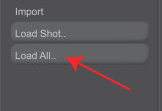 . The order of the shots loaded must be the same as in the RedCine xml project
-
thie message appears when loading an xml RedCine project (such as the one generated by the tool send an editing to RedCine) when all the shots mentioned in the xml have not been already loaded in RedCine (with the buttons 'Load Shot' and 'Load All'
-
get support
-
you have tried everything, but it does not work ? You can drop me an email, describing thoroughly your problem and including the files you're using
- if the problem comes from a fault in the tools, I'll try to solve it
- Do you need an extra feature ? you can order the development of that new feature
-
you have tried everything, but it does not work ? You can drop me an email, describing thoroughly your problem and including the files you're using